Choose another country or region to see content specific to your location and shop online.
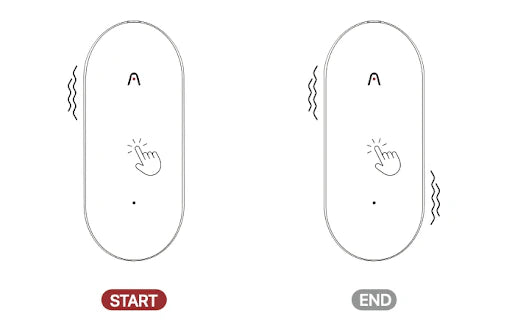
To start a note recording:
1. Toggle down the recording button to Note Recording mode.
2. Long-press the Record Button and hold it for 1 second until you feel 1 vibration, indicating that the recording has started.
3. Long-press the Record Button and hold it for 1 second until you feel 2 vibrations, indicating that the recording has ended.
To start a phone call recording:
1. Toggle up the recording button to Phone Call Recording mode.
2. Long-press the Record Button and hold it for 1 second until you feel 1 vibration, indicating that the recording has started.
3. Long-press the Record Button and hold it for 1 second until you feel 2 vibrations, indicating that the recording has ended.
Fast Shipping
Ship out within 1-2 business days
30-Day Returns
Returns within 30 days of delivery
(Plaud Global official website orders only).
One-Year Warranty
Warranty period subject to local laws
Quick Customer Support
Responses within 24 hours on business days.
1,200 mins/mo AI transcription
Unlimited mins/mo AI transcription
Título de producto de ejemplo
Buscar en nuestro sitio
Búsqueda de tendencias